Merge Layers
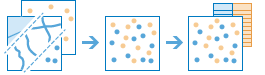
This tool copies features from two layers into a new layer. The layers to be merged must all contain the same feature types (points, lines, or areas). You can control how the fields from the input layers are joined and copied. For example:
- I have three layers for England, Wales, and Scotland and I want a single layer of Great Britain.
- I have 12 layers and each contains parcel information for contiguous townships. I want to join them together into a single layer, keeping only the fields that have the same name and type on the 12 input layers.
If Use current map extent is checked, only the features visible within the current map extent will be merged. If unchecked, all features in both layers will be merged, even if they are outside the current map extent.
Choose layer
The point, line, or area features to merge with the layer specified below.
Choose Layer to merge
Choose the layer to merge with the first layer.
Modify merging fields
By default, all fields from both inputs will be carried across to the output. You can change how fields are carried over to the output as follows:
- Rename—The field will be renamed on the output.
- Remove—The field will be removed from the output.
- Match—The field names are made equivalent. Values of the field from the layer to merge will be copied to the matched output field.
If both layers contain a field with an identical name and data type, the content of both fields will be merged into one field of that name. This does not apply to fields where Match is used in the Modify merging fields parameter.
Result layer name
זהו השם של השכבה שתיווצר ב התוכן שלי ותתווסף למפה. שם ברירת המחדל מבוסס על שם הכלי ושם שכבת הקלט. אם שם השכבה כבר קיים, תתבקש לספק שם אחר.
בעזרת התפריט הנפתח שמור תוצאה ב, באפשרותך לציין את שם התיקייה ב תוכן שלי שבה התוצאה תישמר.